
Hello, let me review about the Zombie Wave defense shooter game I made.
Here are the lists of what I participated in:
- Made spawners for Enemies (EnemySpawner.cs)
- Designed manager to spawn enemies on each lane (SpawnManager.cs)
- Created Grid and Grid Building System with Buildable Objects (Grid.cs, GridBuildingSystem.cs, Scriptable Object)
- Designed and programmed weapon upgrades (Gun Recoil, Grenades, Bomb effects, Reticle effect)
- Made Turret AI which detects enemies nearby (TurretAI.cs, Detector.cs)
- Added sound effects
- Added Sky control for day and night effect
Turret AI
Turret AI reads enemies within the bound as array and sorts enemies by the distance.
I found that sorting in array does not work for some reason.
To fix this, I made additional list that has all elements of the array and sorted the list instead.

Detector.cs
- Detector will detect enemies and the Target field of Detector will be the target of Turret.
- Uses Physics.OverlapSphere to detect objects
public bool Detection()
{
colliderList.Clear();
    if (Target != null) // when Target is not null
    {
        colliders = Physics.OverlapSphere(detectorOrigin.position + detectorOriginOffset,
                                detectorSize * 1.5f,
                                detectorLayerMask);
    }
    else
    {
        colliders = Physics.OverlapSphere(detectorOrigin.position + detectorOriginOffset,
                                detectorSize,
                                detectorLayerMask);
    }
    for (int i = 0; i < colliders.Length; i++)
    {
        colliderList.Add(colliders[i]);
    }
    SortObjectsOnDistance(colliderList);

    if (colliders != null && colliders.Length > 0)
    {
        // Set Target
        // animation to shoot
        target = colliderList[0].gameObject;
        if (target != null)
        {
            isDetected = true;
            turretAI.SetTarget(target.transform);
        }
    }
    else
    { // set animation to null
        target = null;
        isDetected = false;
        if (turretAI != null)
            turretAI.SetTarget(null);
    }

    return Target != null;
}
Gizmos to show the range of attack.
Set the material alpha less than 200 will do so.
GridBuildingSystem.cs:
private void Update()
    {
        if (Input.GetKeyDown(KeyCode.Y))
        {
            buildReady = !buildReady;
            UtilsClass.CreateWorldTextPopup($"Build Mode: {buildReady}", Mouse3D.GetMouseWorldPosition());
        }


        if (Input.GetKeyDown(KeyCode.Mouse1) && buildReady)
        {
            buildReady = false;


            Vector3 mousePos = Mouse3D.GetMouseWorldPosition();
            grid.GetXZ(mousePos, out int x, out int z);
            //Debug.Log("x and z: " + x + ", " + z);

            List<Vector2Int> gridPosList = placedObject.GetGridPositionList(new Vector2Int(x, z), currentDirection);

            // Test can build
            bool canBuild = true;
            foreach (Vector2Int gridPos in gridPosList)
            {
                if (!grid.GetGridObject(gridPos.x, gridPos.y).CanBuild())
                {
                    // if can't build here
                    canBuild = false;
                    break;
                }
            }


            //GridObject gridObject =  grid.GetGridObject(x, z);
            if (canBuild && MoneyManager.Instance.UseMoney(placedObject.cost))
            {
                // Builds the Turret here

                //Debug.Log("Clicked: " + x + ", " + z);
                Vector2Int rotOffset = placedObject.GetRotationOffset(currentDirection);
                Vector3 placedObjectWorldPos = grid.GetPlacementPosition(placedObject.prefab, x, z);
                placedObjectWorldPos.y = 1.67f;
                Transform builtTransform = Instantiate(placedObject.prefab,
                                                        placedObjectWorldPos,
                                                        Quaternion.Euler(0, placedObject.GetRotationAngle(currentDirection),
                                                        0));

                foreach (Vector2Int gridPos in gridPosList)
                {
                    grid.GetGridObject(gridPos.x, gridPos.y).SetTransform(builtTransform);
                }
            }
            else
            {
                UtilsClass.CreateWorldTextPopup("Cannot build here!", Mouse3D.GetMouseWorldPosition());
            }
        }

        if (Input.GetKeyDown(KeyCode.T))
        {
            currentDirection = PlacedObjects.GetNextDir(currentDirection);
            UtilsClass.CreateWorldTextPopup("" + currentDirection, Mouse3D.GetMouseWorldPosition());
        }
    }
SpawnManager.cs


Made it easy format for designers to change the settings easily.
Later I realized I could possibly use scriptable objects or add editor scripts to make it even easier to edit.
Wave: wave index starting from 0
WaveType: which lane you want to spawn your enemy
Wave Duration: How long each round lasts
Enemy Num: How many enemies being spawned over time
Boss: Boss object, will not be spawned unless Spawn Boss is checked to true
Spawn Boss: boolean to see if boss is going to be spawned for that wave
Quick Overview:
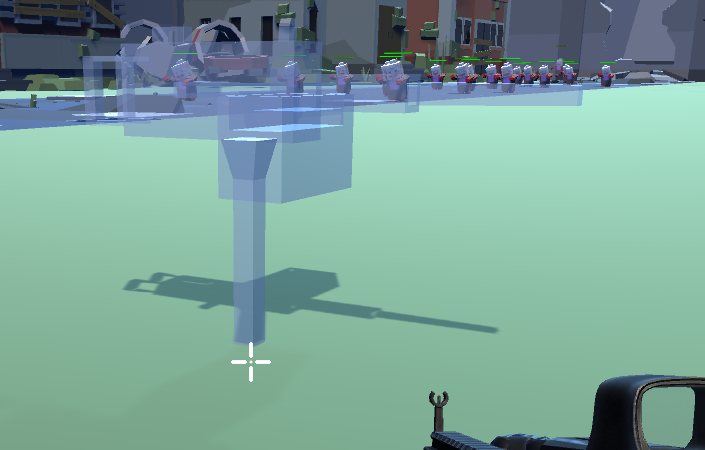
Press Y key to enter build mode.
- Entering build mode will show the preview of the turret on the mouse position(Mouse3D) as shown below.
- Pressing Y while in build mode will exit the build mode.
Press T key to change the direction of the turret: Direction.Up, Left, Right, Down.
It will simply change the rotation of the turret using Quaternions and Eulers.

Rage on fire as enemy wave will start on its lane.
Added Pebble effects on the sky to create atmosphere of apocalypse world.
Here are some contributions I made to this project
Contribution:

Trailer:
https://www.youtube.com/watch?v=ytfo9PKWcS8&t=1s
Code Walkthrough:
https://www.youtube.com/watch?v=4iNlGqzPhMs&t=183s
Github:
https://github.com/LittleRookey/ZombieDefenseShooter
GitHub - LittleRookey/ZombieDefenseShooter
Contribute to LittleRookey/ZombieDefenseShooter development by creating an account on GitHub.
github.com